Install the app
How to install the app on iOS
Follow along with the video below to see how to install our site as a web app on your home screen.
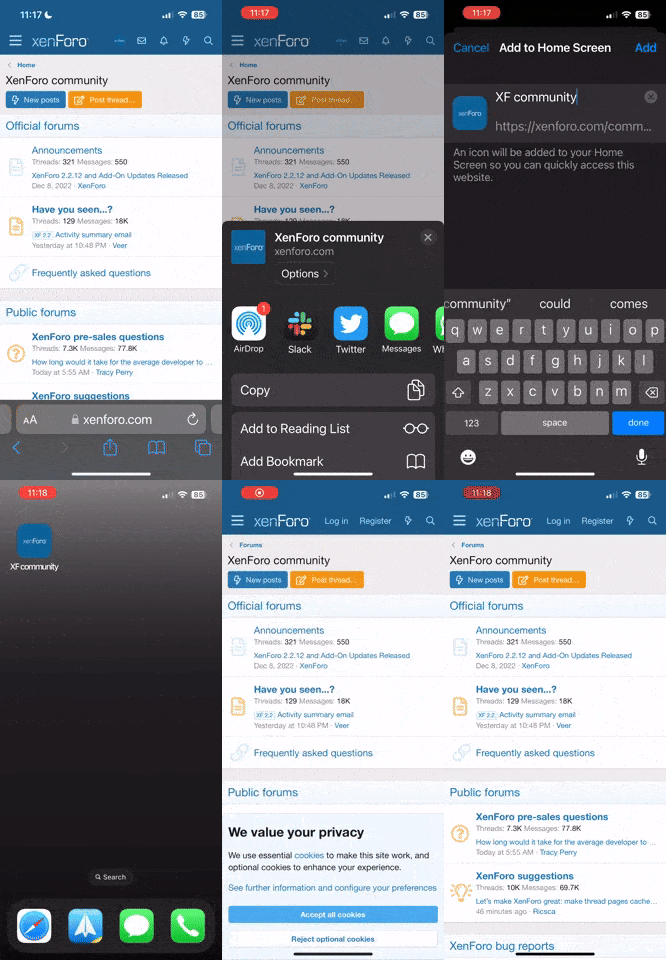
Note: this_feature_currently_requires_accessing_site_using_safari


You are using an out of date browser. It may not display this or other websites correctly.
You should upgrade or use an alternative browser.
You should upgrade or use an alternative browser.
Discount FunnelFlux Pro | 14 Day Trial & 50% Off 1st Month
- Thread starter AffiliateFix
- Start date






Just a note, this discount isn't deprecated but you should focus on our new SaaS platform, FunnelFlux Pro.
For AffiliateFix users we are offering 50% off your first month, in addition to a 28-day free trial.
For AffiliateFix users we are offering 50% off your first month, in addition to a 28-day free trial.


Just a note, this discount isn't deprecated but you should focus on our new SaaS platform, FunnelFlux Pro.
For AffiliateFix users we are offering 50% off your first month, in addition to a 28-day free trial.
CORRECTED! Get your tracking on track today with FunnelFlux Pro.
This newest FunnelFlux Pro is a kick-ass tracker with loads of great performance options.
Thanks! Could we also change this thread title? e.g. to FunnelFlux Pro | 28-day Trial + 50% off your first month.
Also, quick update, I just prototyped conversion tracking using Facebook's S2S API.
You can see instructions here - Tracking Conversions Using the Facebook S2S Tracking API
For now its as simple as using a postback and passing the data stated. We'll make a nicer UI later, I just wanted to move fast!
We also recently released our raw event explorer, and added a quickstart wizard that lets you spin up a quick lander > offer flow in seconds
Also, quick update, I just prototyped conversion tracking using Facebook's S2S API.
You can see instructions here - Tracking Conversions Using the Facebook S2S Tracking API
For now its as simple as using a postback and passing the data stated. We'll make a nicer UI later, I just wanted to move fast!
We also recently released our raw event explorer, and added a quickstart wizard that lets you spin up a quick lander > offer flow in seconds

Could we also change this thread title? e.g. to FunnelFlux Pro | 28-day Trial + 50% off your first month.
Done!
That's a great offer, @Zeno (FunnelFlux) !
Just a casual bump!
We just released a TikTok server-to-server tracking integration to go along with our Facebook CAPI one, and a UI to make it easier.
Posting this because we had a lot of people rushing to us to use it (who weren't even FunnelFlux users) simply because we had it, they needed it, no one else has it. Seems there's a lot of affiliates who want S2S TikTok tracking right now!
I'm also working on similar S2S integrations for Adwords, Microsoft Ads, and Snapchat. With Snapchat its not yet practical as they don't have a click ID, but I have it on good authority that they are working on creating a click ID functionality, and once they release it, I'll have an integration up in a few hours.
-Zeno
We just released a TikTok server-to-server tracking integration to go along with our Facebook CAPI one, and a UI to make it easier.
Posting this because we had a lot of people rushing to us to use it (who weren't even FunnelFlux users) simply because we had it, they needed it, no one else has it. Seems there's a lot of affiliates who want S2S TikTok tracking right now!
I'm also working on similar S2S integrations for Adwords, Microsoft Ads, and Snapchat. With Snapchat its not yet practical as they don't have a click ID, but I have it on good authority that they are working on creating a click ID functionality, and once they release it, I'll have an integration up in a few hours.
-Zeno
Self-bumping with our limited-time Black Friday deal!
For the next few days (expiring on Monday), you can get 67% off your first 3 months on any FF Pro plan.
You can access our deal page here - https://funnelflux.com/pro/black-friday-2021/
Hey all, we're excited to announce the launch of a new feature, Simple Flows
Simple Flows are a new user interface that allows you to manage simple lander > offer sequences without having to use the more complex (though more powerful) visual funnel builder.
These flows let you quickly spin up multiple "paths", which are sequences of pages, create rules to match incoming visitors, then control routing of visitors to the various paths.
They are simple, flexible, and will feel like home for those coming from other trackers.
You can read our documentation to see more about them here - Using Simple Flows
Our visitor journey reporting also makes it possible to see how users matched different rules, what paths they went to, and ultimately what pages, giving you keen insight into how people are moving through these flows.
In the future we plan to extend their functionality, make reporting easier, and allow them the be converted to a visual funnel -- so you could always build out simple flows, then later when more complex manipulation is needed, convert it to a visual funnel and continue tracking away.
These are in beta, so feedback welcome!
P.S. we also finished our S2S integrations with Google and Microsoft ads a while back!
Quite a few new updates since my last post!
You can check out some release notes here.
Once we do that, we'll be in a much better position to:
Each plan will come with 1 M monthly events or similar, and then everything above that will be overages.
No low, mid, high tier plans with different event quotas and overage tiers. It will be very simple, i.e. you pay $99/mo, and then something like $10 per 1 M events over that.
Most competitors force you to the highest plans to lower the per-event cost. I'd rather keep it simple and let the cost directly relate to usage, period. No need to sign up for enterprise plans or annual contracts to get the lower costs. Our overage rate will also be lower than almost everyone else, from what I can tell.
Also, we have added a standby plan for $9/mo, so if you need to take a break or don't want to lose your data, there's an option for that.
You can check out some release notes here.
- Updated our dashboard to be a lot more useful, less limiting
- Released a campaign analysis page to allow faster drilldowns for your common campaign optimisation workflows
- Released our V2 Javascript, which is a lot simpler to use -- now just a single global snippet + optional override snippets
- Released our customer API
- Updated our pricing plans slightly
Once we do that, we'll be in a much better position to:
- Add custom events
- Change to allow attribution by event time and entrance time, which often causes some confusion - but neither is best, they are better for different reporting goals
- Adding custom attributes (attributes you can change on-page for a user and view in reporting)
- Update and simplify our pricing
Each plan will come with 1 M monthly events or similar, and then everything above that will be overages.
No low, mid, high tier plans with different event quotas and overage tiers. It will be very simple, i.e. you pay $99/mo, and then something like $10 per 1 M events over that.
Most competitors force you to the highest plans to lower the per-event cost. I'd rather keep it simple and let the cost directly relate to usage, period. No need to sign up for enterprise plans or annual contracts to get the lower costs. Our overage rate will also be lower than almost everyone else, from what I can tell.
Also, we have added a standby plan for $9/mo, so if you need to take a break or don't want to lose your data, there's an option for that.
Also @azgold can we update the title to state 14 day trial now?
We decided to reduce this so that we could be a bit more fast-paced with onboarding, and most users figure out if they want to use the tool or not within two weeks.
We also have a trial extension option available for people who need more time, so it all works out similar anyway.
We decided to reduce this so that we could be a bit more fast-paced with onboarding, and most users figure out if they want to use the tool or not within two weeks.
We also have a trial extension option available for people who need more time, so it all works out similar anyway.
Guess what! We have finally released visual heatmaps in our funnel builder!
Now you can understand funnel performance at a glance with multiple modes -- much faster than tables for many, and especially helpful for those who like the visual aspect of FunnelFlux in the first place (so, probably many of our users!).
Check out the CVR and P&L colour-coding examples below:
Has been a long time since I posted... going to make sure from now that we post more updates and engage with the community here, as we have a lot of exciting features rolling out!
============
We're excited to release a major reporting update: Action Data.
A lot of people have asked in the past about seeing exactly which action users clicked and the conversions that came from those.
We have now added this to journey reporting and heatmaps, along with some new attributes.
Within the report builder you can now see a few more journey attributes that have "w/ actions" in them.
Using these you can add action steps to the breakdown:
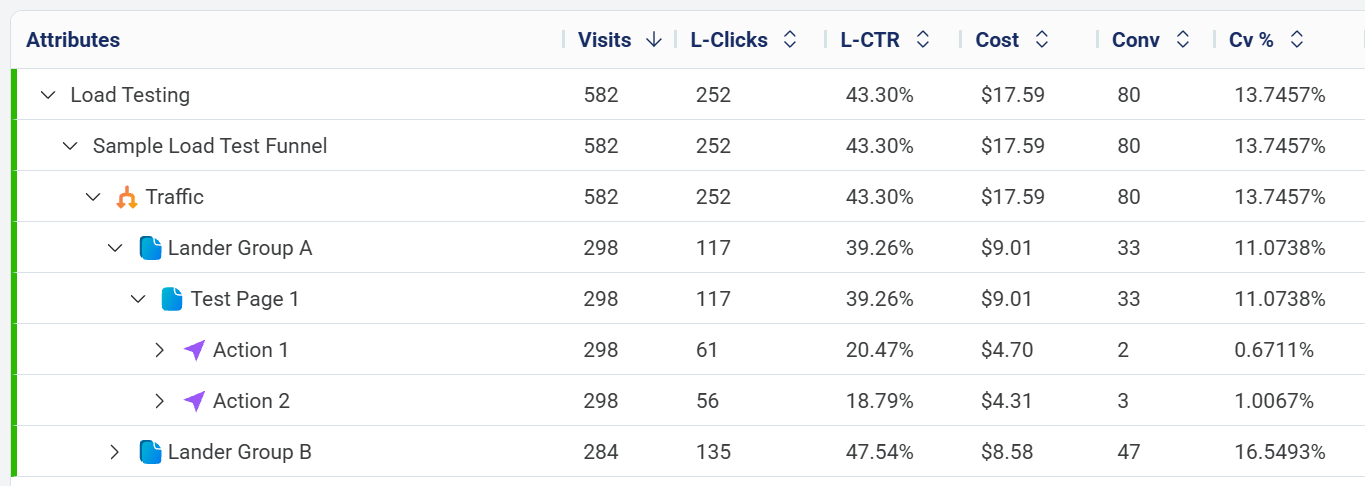
You can now see the breakdown of clicks and CTRs for each action, as well as the downstream conversions, conversion rates, and ROI.
We have also added a new "Pages > Action Number" attribute that provides a simpler breakdown:
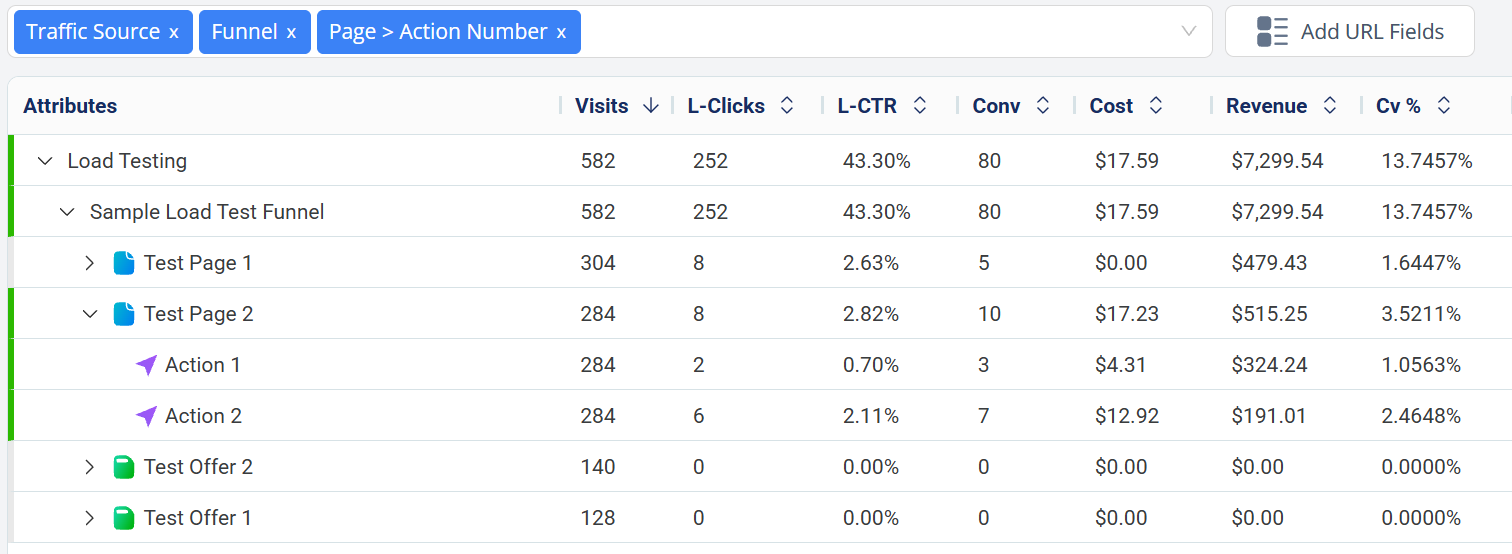
These are all under the "Journey Mapping" category in the attributes list.
Additionally, you can now see analytics data on actions in the funnel builder's heatmap:
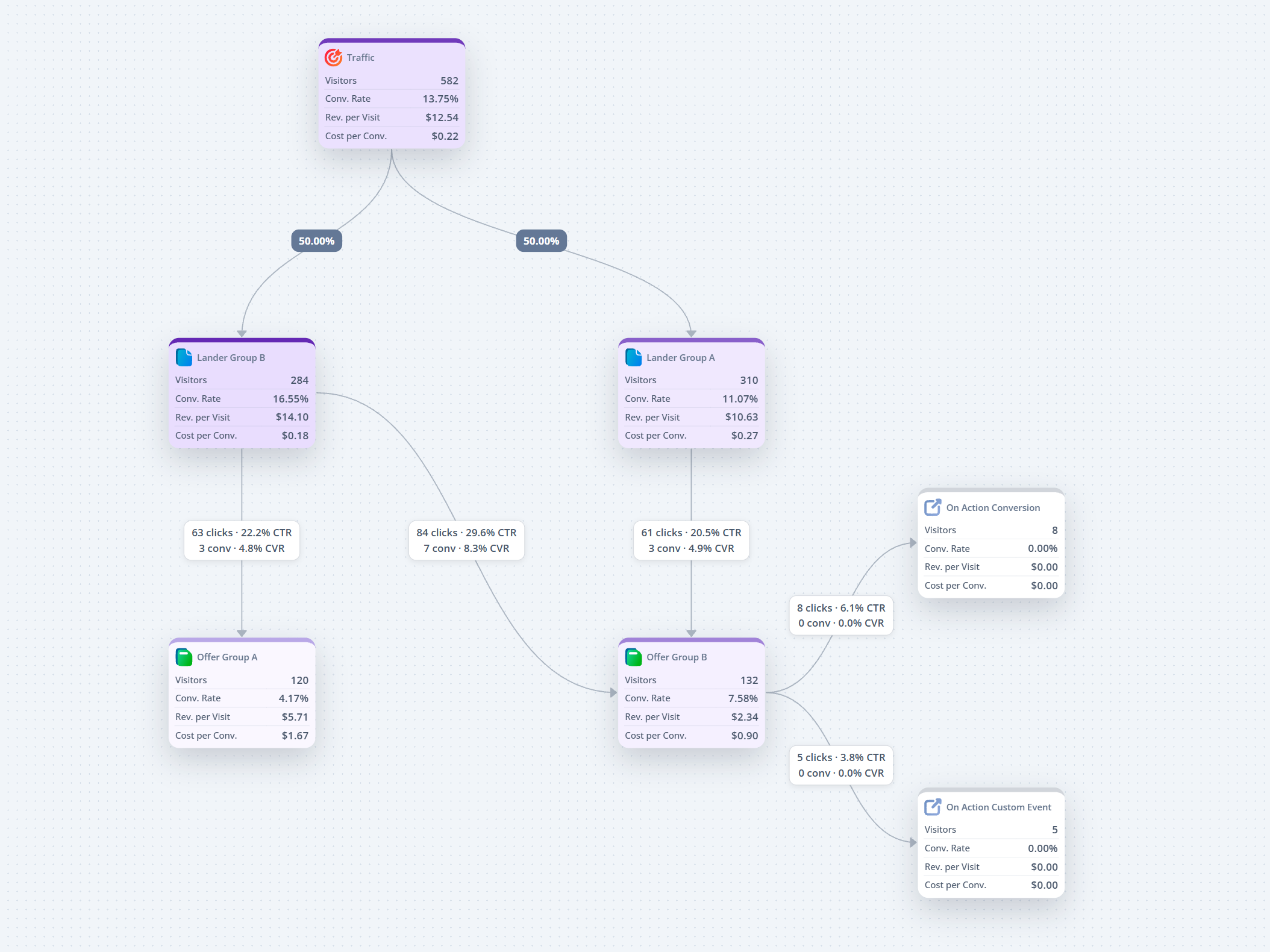
Here, we have added data on the action connections when available, to show clicks, CTR, and other data depending on the report selected.
Note that unfortunately this data is only available from now, after our update -- not for past data. Be aware of this when using these reports across a wider time range.
As this stems from journey data, it's important you group by funnel first in the report builder, then these types of attributes, to avoid confusing data.
More features to come!
============
We're excited to release a major reporting update: Action Data.
A lot of people have asked in the past about seeing exactly which action users clicked and the conversions that came from those.
We have now added this to journey reporting and heatmaps, along with some new attributes.
Within the report builder you can now see a few more journey attributes that have "w/ actions" in them.
Using these you can add action steps to the breakdown:
You can now see the breakdown of clicks and CTRs for each action, as well as the downstream conversions, conversion rates, and ROI.
We have also added a new "Pages > Action Number" attribute that provides a simpler breakdown:
These are all under the "Journey Mapping" category in the attributes list.
Additionally, you can now see analytics data on actions in the funnel builder's heatmap:
Here, we have added data on the action connections when available, to show clicks, CTR, and other data depending on the report selected.
Note that unfortunately this data is only available from now, after our update -- not for past data. Be aware of this when using these reports across a wider time range.
As this stems from journey data, it's important you group by funnel first in the report builder, then these types of attributes, to avoid confusing data.
More features to come!
Another round of updates!
Now you can select multiple sources (don't need to select funnels anymore) and various settings.
It will generate a template to download, which you can fill with data, as below:
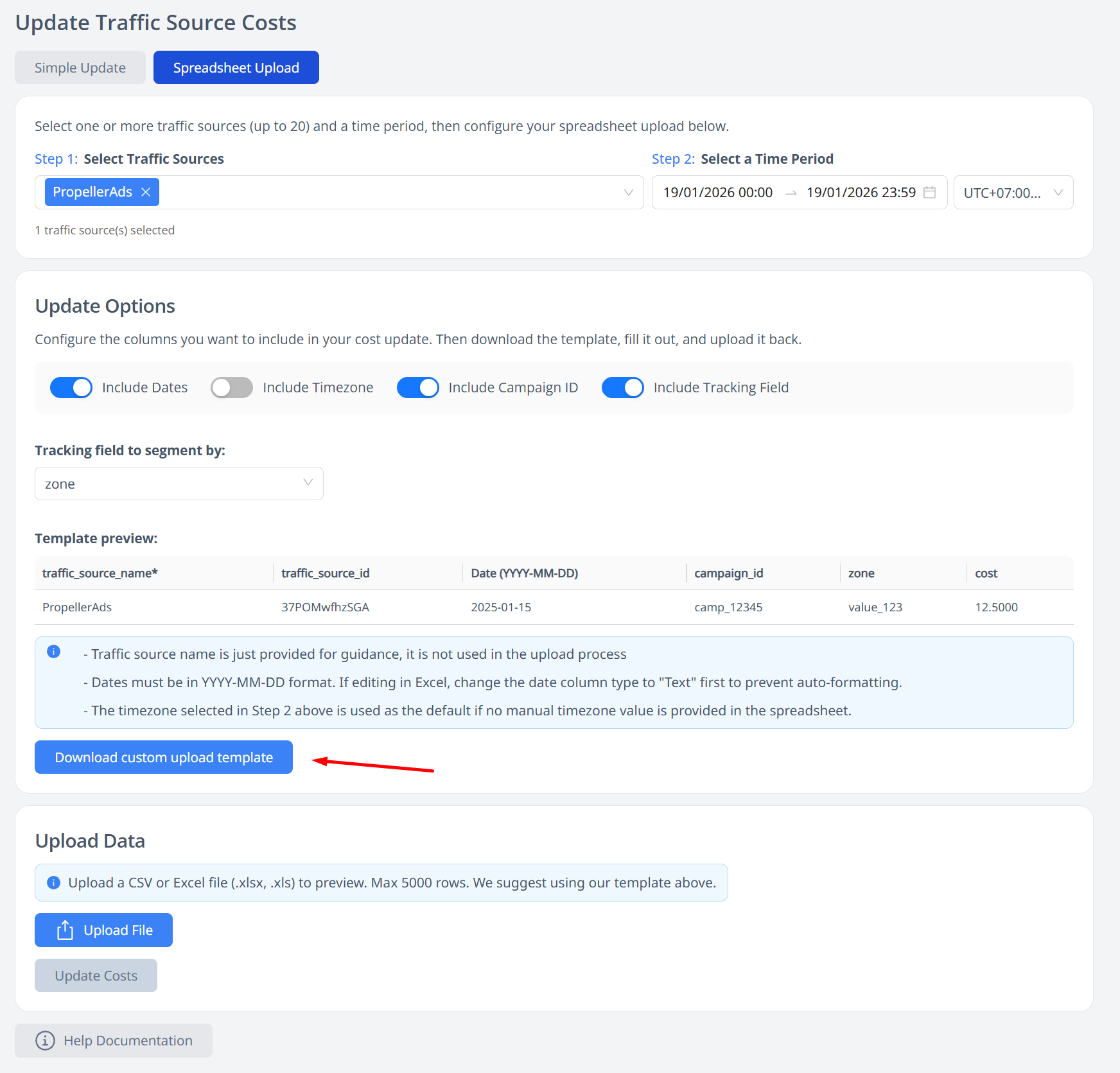
You can reuse the same template and options later for easier uploads.
1. You can now sort by columns properly. If you sort by timestamp, it will now return the newest/oldest events in your time range properly, considering the row limit (before it might get cut off and not return what you wanted).
2. You can now filter by visitor and hit ID, allowing more forensic selection of specfic events.
3. The column selector is now a bit easier to use and shows the 15 column limit more clearly

Now it's much easier to use the raw events page to debug and look up specific hits/session IDs.
Cost Updates
We have removed the "segmented" option and now have an easier to use spreadsheet-based option that extends the old CSV offering.Now you can select multiple sources (don't need to select funnels anymore) and various settings.
It will generate a template to download, which you can fill with data, as below:
You can reuse the same template and options later for easier uploads.
Improvements to the Raw Events page
The raw events page has had a few quality of life improvements.1. You can now sort by columns properly. If you sort by timestamp, it will now return the newest/oldest events in your time range properly, considering the row limit (before it might get cut off and not return what you wanted).
2. You can now filter by visitor and hit ID, allowing more forensic selection of specfic events.
3. The column selector is now a bit easier to use and shows the 15 column limit more clearly
Now it's much easier to use the raw events page to debug and look up specific hits/session IDs.
Use listicles or complex pages with a lot of actions?
Then you'll appreciate this new node type: the Action Proxy, now available in the funnel builder.
So far so good.
But now what if you have half a dozen landers you want to test, and you want them to be separate nodes?
It starts to get messy, with each lander needing to make 20 separate connections to the offers, causing a criss-crossing mess.
This is where the action proxy simplifies things:
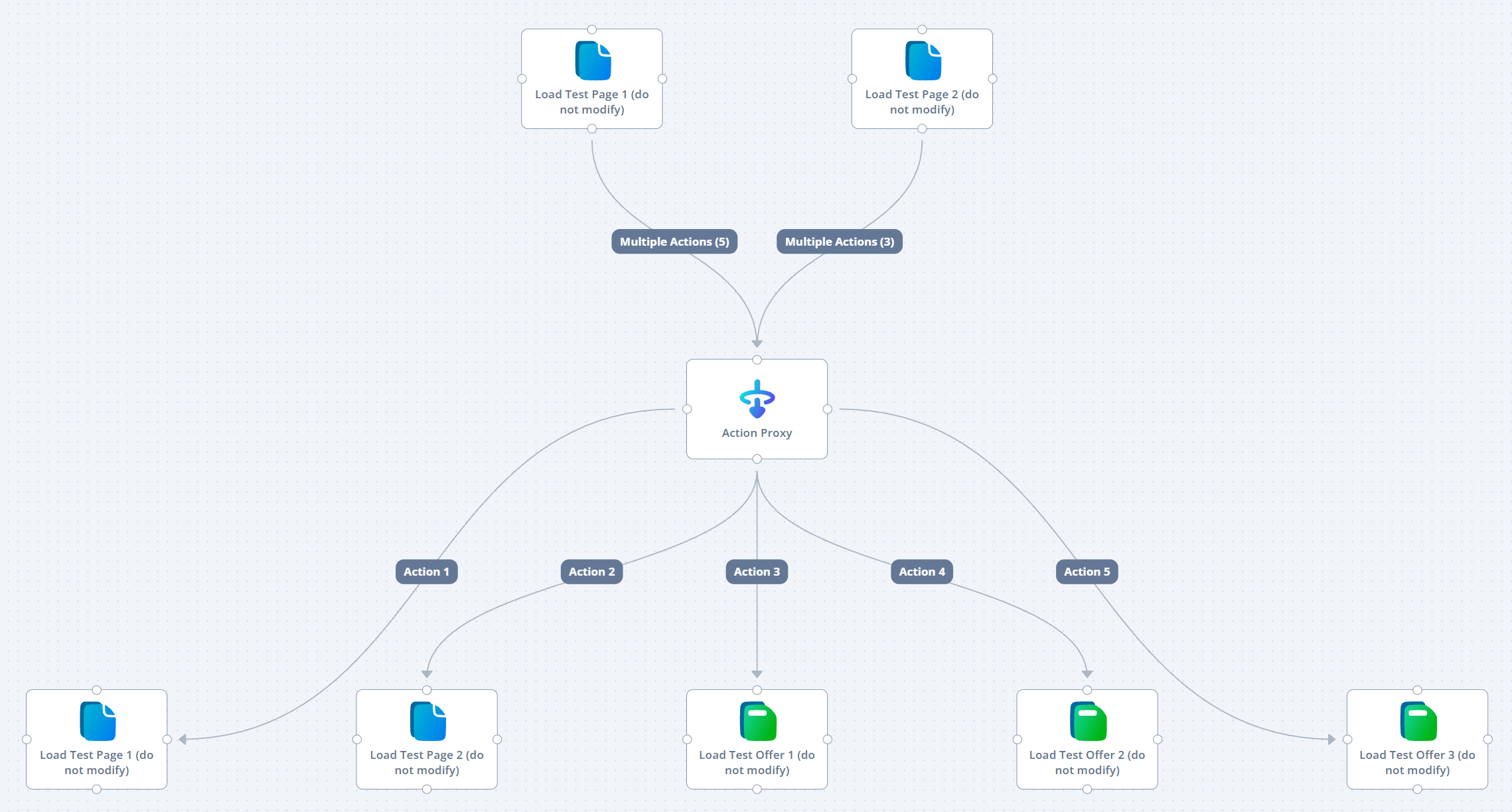
Here, I connect all my landers to the action proxy and use our multiple actions feature -- you can edit an action and have many different numbers go down the same path. Above I have 5 actions on the first page, three on the second, all going to the middle action proxy node.
Then, I can connect each action number to it's intended destination. Whatever action I click on from the lander, it goes down that path after the action proxy node.
Now I can add more listicles as nodes (if I don't want them inside an existing lander group node), make a single new connection, and have it all route fine.
And if I want to split test offers, it's much easier to add new items, or throw a rotator into the mix to split things even further -- without as much visual clutter.
We've rolled out some other updates too but we will announce their details early next week.
Then you'll appreciate this new node type: the Action Proxy, now available in the funnel builder.
How does it work?
The action proxy will take any incoming action and bounce out to the same action. It's a passthrough node.How is this useful?
Imagine you have a listicle with 20 buttons each going to a different offer. You have to make connections from your lander to each destination offer individually.So far so good.
But now what if you have half a dozen landers you want to test, and you want them to be separate nodes?
It starts to get messy, with each lander needing to make 20 separate connections to the offers, causing a criss-crossing mess.
This is where the action proxy simplifies things:
Here, I connect all my landers to the action proxy and use our multiple actions feature -- you can edit an action and have many different numbers go down the same path. Above I have 5 actions on the first page, three on the second, all going to the middle action proxy node.
Then, I can connect each action number to it's intended destination. Whatever action I click on from the lander, it goes down that path after the action proxy node.
Now I can add more listicles as nodes (if I don't want them inside an existing lander group node), make a single new connection, and have it all route fine.
And if I want to split test offers, it's much easier to add new items, or throw a rotator into the mix to split things even further -- without as much visual clutter.
We've rolled out some other updates too but we will announce their details early next week.
Want to track extra data with your conversions?
Event data is here!
Previously, you could only use transaction ID with conversions to track conversion-specific info.
Now, we have introduced two new "event data" attributes that are passable in postbacks, JS and API uploads.
You can find them in the tracking codes section:

You can also show them in the report builder, and as columns in raw events:


These fields will allow you to send custom data about conversions AND custom events.
They do not impact deduplication like transaction IDs do.
The fields support up to 1024 characters, so you can also send multiple bits of data with some separators, or some JSON that you can digest and use later with API-based queries.
Event data is here!
Previously, you could only use transaction ID with conversions to track conversion-specific info.
Now, we have introduced two new "event data" attributes that are passable in postbacks, JS and API uploads.
You can find them in the tracking codes section:
You can also show them in the report builder, and as columns in raw events:
These fields will allow you to send custom data about conversions AND custom events.
They do not impact deduplication like transaction IDs do.
The fields support up to 1024 characters, so you can also send multiple bits of data with some separators, or some JSON that you can digest and use later with API-based queries.
We have just released some minor updates to improve usage of our integrations like Meta, TikTok etc.
If you are working with clients, doing lead gen etc. where you can send PII data (hashed or unhashed), we've made various changes to make this smoother.
We have updated all our endpoints (postbacks, JS, API) to have full support for:
For phone number, our system will strip unnecessary characters and let the integrations handle formatting, so you don't need to worry about the weird formats clients and users might send.
Additionally, in our Postback Logs section, you can now turn on columns that will show if this PII data was passed successfully.
I'd recommend using hit ID or hit+tx as the event ID here.
Minor changes but really useful for those doing leadgen who want to maximise attribution and that annoying EMQ score that seems to mean something but nothing at the same time.
If you are working with clients, doing lead gen etc. where you can send PII data (hashed or unhashed), we've made various changes to make this smoother.
PII data passing
In our settings > tracking codes section, you may notice a lot more details now about optional parameters.We have updated all our endpoints (postbacks, JS, API) to have full support for:
- Phone number
- Zip code
- Event deduplication ID
For phone number, our system will strip unnecessary characters and let the integrations handle formatting, so you don't need to worry about the weird formats clients and users might send.
Additionally, in our Postback Logs section, you can now turn on columns that will show if this PII data was passed successfully.
Event Deduplication ID
You can now pass dedupe_event_id into postbacks to allow deduplication of CAPI events with JS events from the traffic source's pixel tracking.I'd recommend using hit ID or hit+tx as the event ID here.
Minor changes but really useful for those doing leadgen who want to maximise attribution and that annoying EMQ score that seems to mean something but nothing at the same time.
We have rolled out a few new features -- sticky rotators, useful condition node operators, and ability to finally manage domains via API (before, they were frontend only because of the need to add in our backend, then Cloudflare, then update billing).
This affinity and anti-affinity logic is now available in rotator node settings:
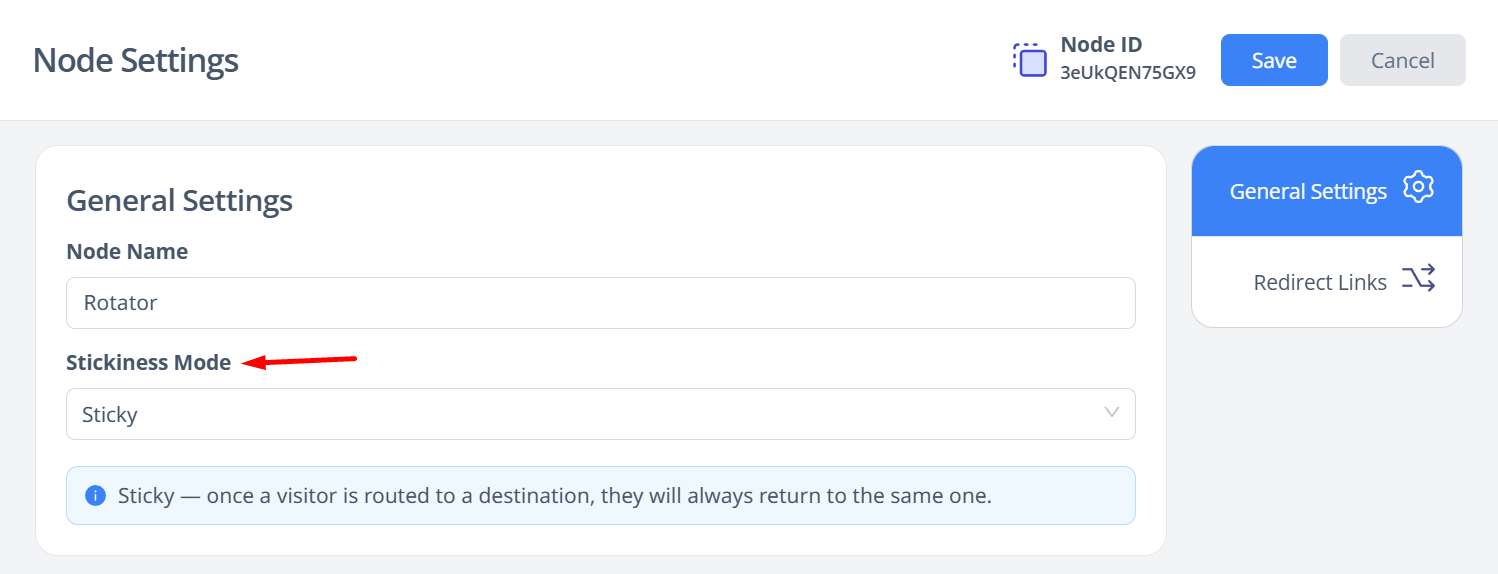
Note this data is at the session level, so is limited by the session persistence. A user coming back after seven days will no longer have session data (even if we recover the session ID from cookies). So this functionality is aimed at repeat visitors within a short timeframe, e.g. in a 24 hour window.
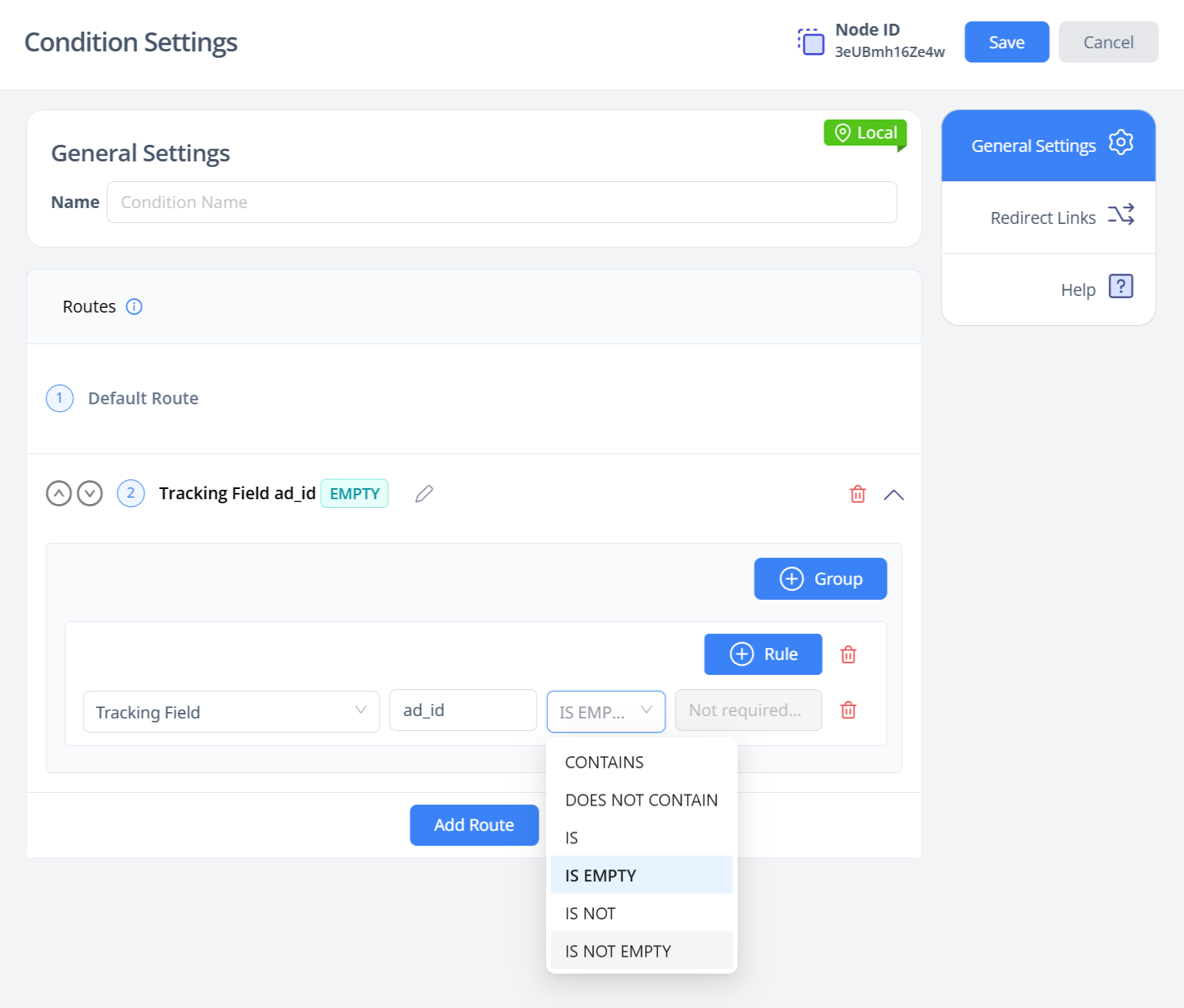
This will allow you to more easily redirect users based on URL parameters being present or not, or having no value. Likewise with direct visits that have no referrer value.
For users who need programmatic domain control this is likely very helpful news!
Now, our backend domain API handles all the management of adding to our assets, Cloudflare, and updating billing. It will be relatively high latency when adding domains since it has to do all these processes behind the scenes (e.g. 5-10 seconds).
We have updated our API docs here to reflect all our recent API changes
Rotator Stickiness Settings
We've had a few requests in the past for "smart" rotation where you can make sure the same user always gets rotated to the same page – or the opposite, where a user is always routed to a new destination if they visit the same rotator multiple times.This affinity and anti-affinity logic is now available in rotator node settings:
Note this data is at the session level, so is limited by the session persistence. A user coming back after seven days will no longer have session data (even if we recover the session ID from cookies). So this functionality is aimed at repeat visitors within a short timeframe, e.g. in a 24 hour window.
Condition Node Updates
Tracking field and referrer properties can now use the IS EMPTY and IS NOT EMPTY operatorsThis will allow you to more easily redirect users based on URL parameters being present or not, or having no value. Likewise with direct visits that have no referrer value.
Domain API Updates
Domains can now be managed via API directly, rather than only via the frontend.For users who need programmatic domain control this is likely very helpful news!
Now, our backend domain API handles all the management of adding to our assets, Cloudflare, and updating billing. It will be relatively high latency when adding domains since it has to do all these processes behind the scenes (e.g. 5-10 seconds).
We have updated our API docs here to reflect all our recent API changes
Have been busy powering through release of our V2 backend services -- not something exciting for customers, but exciting for me as it unblocks a lot of things that were stifling our development momentum.
So you'll begin to see a lot more interesting and exciting updates coming from us, as well as my new vision for FunnelFlux in 2026.
Here's a quick summary of our latest changes:

Additionally, on our cost update > spreadsheet tab, the template creator and upload process is much smoother.
You can generate templates for guidance (optional), and can otherwise upload detailed sheets to update multiple traffic sources, campaigns, datetime ranges, etc. all at once.
You can easily use the template + reporting exports from your traffic sources + AI to quickly produce organised cost upload data.

For those of you using AI tools a lot like Claude Code and Codex, it will be really easy now to build some automated workflows to crunch daily exports from any kind of traffic source > mux it all into a cost update Excel file > upload and apply costs.
I think this is great as it's arguably easier than trying to figure out API automations everywhere, and is immediately applicable to every traffic source, since all of them will export reporting data but not all even have accessible APIs!
We have made some changes to give dramatically faster reports — Offer, lander, and category reports are now up to 50x faster (tho admittedly this is partly because they decreased in performance initially).
Time-based drilldowns (Hour of Day, Day of Week, etc.) performance has been improved as well.
Additionally, I did a massive sweeping improvement of our UI caching/performance UX.
Now, all our reports on all pages cache briefly, so you can swap between sections instantly with no reload. Our report builder also stores the last report data now too.
On our dashboard, I added caching for the graphs and all reports (for a few minutes), likewise in our quickstats, so you can instantly switch back and forth between recently loaded data.
Everything should feel a lot snappier from this.
A lot more updates to come as I roll out my 2026 vision. You will see some major Argosync updates soon as well -- another system where I have been figuring out what my vision for it is, and doing a bit of stealth mode work on this.
So you'll begin to see a lot more interesting and exciting updates coming from us, as well as my new vision for FunnelFlux in 2026.
Here's a quick summary of our latest changes:
Cost Update Improvements
From the campaign analysis page, you can now push targeted manual cost updates for specific campaign IDs directly from this UI:Additionally, on our cost update > spreadsheet tab, the template creator and upload process is much smoother.
You can generate templates for guidance (optional), and can otherwise upload detailed sheets to update multiple traffic sources, campaigns, datetime ranges, etc. all at once.
You can easily use the template + reporting exports from your traffic sources + AI to quickly produce organised cost upload data.
For those of you using AI tools a lot like Claude Code and Codex, it will be really easy now to build some automated workflows to crunch daily exports from any kind of traffic source > mux it all into a cost update Excel file > upload and apply costs.
I think this is great as it's arguably easier than trying to figure out API automations everywhere, and is immediately applicable to every traffic source, since all of them will export reporting data but not all even have accessible APIs!
Reporting Improvement
Our new reporting service makes it much easier for us to optimise SQL queries.We have made some changes to give dramatically faster reports — Offer, lander, and category reports are now up to 50x faster (tho admittedly this is partly because they decreased in performance initially).
Time-based drilldowns (Hour of Day, Day of Week, etc.) performance has been improved as well.
General UI Performance
We patched a critical issue in our table library that caused sluggishness with big reports (>1000 rows). Now the tables are much faster with big data sets.Additionally, I did a massive sweeping improvement of our UI caching/performance UX.
Now, all our reports on all pages cache briefly, so you can swap between sections instantly with no reload. Our report builder also stores the last report data now too.
On our dashboard, I added caching for the graphs and all reports (for a few minutes), likewise in our quickstats, so you can instantly switch back and forth between recently loaded data.
Everything should feel a lot snappier from this.
A lot more updates to come as I roll out my 2026 vision. You will see some major Argosync updates soon as well -- another system where I have been figuring out what my vision for it is, and doing a bit of stealth mode work on this.
We have rolled out a number of important improvements to reporting, particularly around drilling down into lander/offers, as well as a new UI for analysing specific hits and visitor sessions.

This new UI is primarily to help with critical debugging of hits and session flows.
For visitor IDs, you can see a timeline of hit events. You can click these blocks to jump between inspecting a specific hit, and can click visitor ID again to go back to the visitor ID analysis.

Additionally, we have added an "inspect" button to the raw event and postback pages, allowing you to jump to this inspector.

We now filter it and will be removing it from historic data to clean up reporting.
This will mainly affect the data you see when opening quickstats for an offer or lander, or doing drilldowns in the report builder that group by a page attribute, followed by others.
For example: Funnel > Offer > Traffic Source > Country
These are inherently complex, because it groups by viewing a specific page that is deep inside a funnel somewhere, then expands further.
In general you can't simply filter to that page, because you lose context of the overall funnel visits, the cost it truly took to get people to that page, and in the case of landers you need to consider the downstream offer conversions that attribute back up the journey.
This is one of the most complex parts of our system because of how FunnelFlux lets you make any sort of funnel, with steps in any order.
I am somewhat jealous of most other trackers that have really simple traffic > lander > offer flows only (often with the offer destinations pre-ordained in advance)... must be much easier to deal with the query logic!
Otherwise, we've also tweaked caching, so swapping between pages and quickstat reports is smoother and faster than ever before.
New UI - Hit Explorer
This new UI is primarily to help with critical debugging of hits and session flows.
For visitor IDs, you can see a timeline of hit events. You can click these blocks to jump between inspecting a specific hit, and can click visitor ID again to go back to the visitor ID analysis.
Additionally, we have added an "inspect" button to the raw event and postback pages, allowing you to jump to this inspector.
Improvements to Raw Events
On the raw events page, we have made the following quality of life improvements:- Now limited to 20 columns max (up from 15)
- Timestamp, event type, hit ID are all pinned columns on the left now and are removed from column selection
- Asset names and ID are extended -- you can now get page ID, page name, offer source ID, name etc.
- You can now click an inline inspect icon to jump to the hit inspector
Improvements to Posback Logs
- We have added page name, page category and offer source as columns
- Have also updated to make timestamp, event, hit ID permanent pinned columns
- Also added an inspector button to jump to see full details of a specific hit
Filtering Updates
We discovered a new user-agent that was responsible for a lot of bot traffic -- 'hertz', specifically associated with a TikTok ISP and Singapore-based.We now filter it and will be removing it from historic data to clean up reporting.
Reporting Improvements
We have rolled out changes to improve the cost and conversion attribution data, especially when drilling down into lander/offer type attributes.This will mainly affect the data you see when opening quickstats for an offer or lander, or doing drilldowns in the report builder that group by a page attribute, followed by others.
For example: Funnel > Offer > Traffic Source > Country
These are inherently complex, because it groups by viewing a specific page that is deep inside a funnel somewhere, then expands further.
In general you can't simply filter to that page, because you lose context of the overall funnel visits, the cost it truly took to get people to that page, and in the case of landers you need to consider the downstream offer conversions that attribute back up the journey.
This is one of the most complex parts of our system because of how FunnelFlux lets you make any sort of funnel, with steps in any order.
I am somewhat jealous of most other trackers that have really simple traffic > lander > offer flows only (often with the offer destinations pre-ordained in advance)... must be much easier to deal with the query logic!
Otherwise, we've also tweaked caching, so swapping between pages and quickstat reports is smoother and faster than ever before.
Similar threads


- Replies
- 12
- Views
- 8K

- Replies
- 1
- Views
- 6K