




We’ve all heard the official line: two campaigns with identical keywords inside the same account don't compete against each other in the auction. Google’s docs state that if multiple keywords match a search query, the system just picks the one with the highest Ad Rank at that exact millisecond.
But if you spend enough time on BlackHatWorld or Reddit, you'll see plenty of threads that completely contradict this. Take one BHW user who tested it out: he launched three identical campaigns and watched his CPC skyrocket the moment the second one went live. He was left wondering if his keywords were actually cannibalizing each other.

Another business owner shared a similar story on Reddit. He ran two identical campaigns for different branches of his company, using the exact same keywords, targeting, and settings. As soon as the duplicate went live, his cost per click jumped, and performance tanked for both.

So, how does this happen if Google swears only one keyword enters the auction? Let’s break down what’s going on under the hood and how to keep your CPC from blowing up when scaling.

When you have two identical campaigns running simultaneously on the same audience, Google has to filter them at the account level before the external auction even starts.
Here is why things go sideways:
1. Google Picks the Worse Ad Variation Since both campaigns technically have equal priority, Google’s backend algorithms decide which creative gets the impression. To maximize its own eCPM (revenue per thousand impressions), the system might favor a combination with a higher Ad Rank. In reality, this often means a higher bid or a lower Quality Score, resulting in a significantly higher actual CPC for you.

This issue hits hardest if your account has a weak history. High-tier agency setups like YeezyPay help bypass this filter bottleneck. Their seasoned profile history forces a better baseline Ad Rank from the start, meaning Google's backend doesn't just default to bleeding your budget with the most expensive click variation.
2. Split Learning Data When you duplicate a campaign, you immediately fragment your data. The original campaign suddenly stops getting the steady stream of conversions it needs to keep learning, while the new campaign starts from zero. Smart Bidding thrives on clean data loops. By splitting the traffic, you’re feeding the algorithm an incredibly noisy signal, causing bids to fluctuate and CPC to spike.

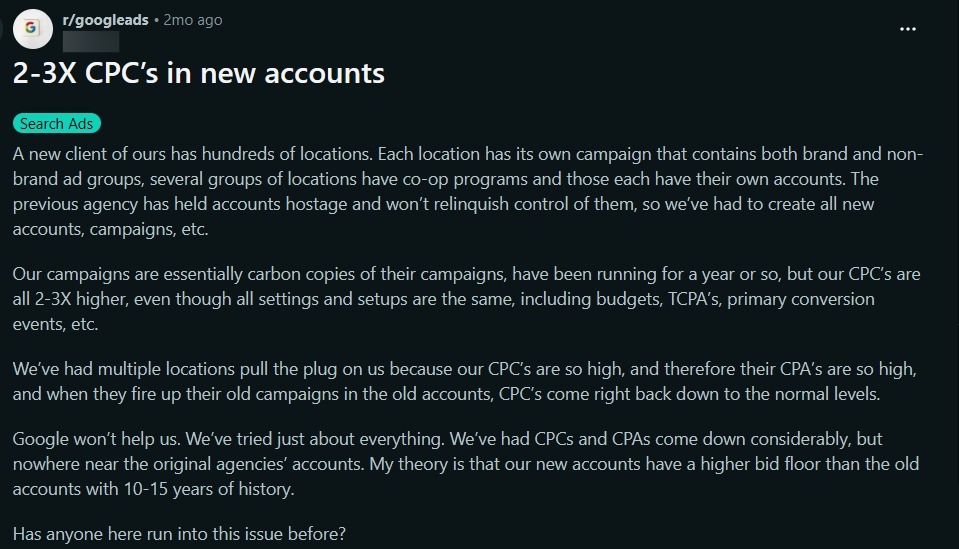
3. Account History and Trust Issues Fresh accounts or brand-new campaigns always get hit with much higher baseline CPCs than seasoned ones. On Reddit, buyers report bids being up to 3x higher on new profiles compared to established setups with identical settings. An unseasoned account with zero history struggles to clear Ad Rank thresholds efficiently, leading to poor traffic distribution and inflated costs.
Aggressive Cross-Negativing To stop campaigns from stepping on each other's toes, you need to completely isolate their traffic. Add the keywords of campaign B as negatives in campaign A, and vice versa.

Doing this manually is a massive grind. You have to constantly audit search term reports and move junk queries over. Most teams automate this via scripts. But if you try running heavy API automation on a raw self-registered account, Google’s automated compliance filters will instantly slap you with a "suspicious activity" ban. To run these aggressive scripts safely, buyers rely on trusted agency solutions like YeezyPay, where the accounts carry enough backend weight to handle rapid bulk edits and automated scripts without triggering automated red flags.
Consolidation Over Duplication If you’re duplicating campaigns just to target different dayparting windows or user intents, you're usually better off not fighting the algorithm. The consensus on the forums is to merge duplicates back into a single campaign and split them by ad groups instead. Consolidating your data lets Smart Bidding optimize properly without inflating your CPC.

Of course, migrating keywords, rebuilding structures, and resetting negatives means putting your campaigns back into review. On fragile profiles, major structural changes in gray-hat niches are a shortcut to a suspension.
If you're burning cash, the solution isn't spinning up more copies - it's cleaning up the overlap. Pull your search term reports, isolate your campaigns with cross-negatives, or collapse everything into a cleaner ad group structure.
And if you want to focus on actual optimization rather than fighting compliance every time you edit a campaign, moving your traffic to YeezyPay's agency account infrastructure takes the headache off the table. These profiles handle heavy budget scaling and structural changes smoothly, and if an automated flag does happen in a volatile niche, you can instantly shift your remaining balance to a fresh profile without losing your ad spend.
But if you spend enough time on BlackHatWorld or Reddit, you'll see plenty of threads that completely contradict this. Take one BHW user who tested it out: he launched three identical campaigns and watched his CPC skyrocket the moment the second one went live. He was left wondering if his keywords were actually cannibalizing each other.
Another business owner shared a similar story on Reddit. He ran two identical campaigns for different branches of his company, using the exact same keywords, targeting, and settings. As soon as the duplicate went live, his cost per click jumped, and performance tanked for both.
So, how does this happen if Google swears only one keyword enters the auction? Let’s break down what’s going on under the hood and how to keep your CPC from blowing up when scaling.
Where the "Self-Competition" Actually Comes From
To understand why your CPC spikes, you have to look at how Google calculates your actual cost per click. It’s a mix of ad quality, expected CTR, relevance, landing page experience, your max CPC bid, and the overall search context like user intent and Ad Rank thresholds.When you have two identical campaigns running simultaneously on the same audience, Google has to filter them at the account level before the external auction even starts.
Here is why things go sideways:
1. Google Picks the Worse Ad Variation Since both campaigns technically have equal priority, Google’s backend algorithms decide which creative gets the impression. To maximize its own eCPM (revenue per thousand impressions), the system might favor a combination with a higher Ad Rank. In reality, this often means a higher bid or a lower Quality Score, resulting in a significantly higher actual CPC for you.
This issue hits hardest if your account has a weak history. High-tier agency setups like YeezyPay help bypass this filter bottleneck. Their seasoned profile history forces a better baseline Ad Rank from the start, meaning Google's backend doesn't just default to bleeding your budget with the most expensive click variation.
2. Split Learning Data When you duplicate a campaign, you immediately fragment your data. The original campaign suddenly stops getting the steady stream of conversions it needs to keep learning, while the new campaign starts from zero. Smart Bidding thrives on clean data loops. By splitting the traffic, you’re feeding the algorithm an incredibly noisy signal, causing bids to fluctuate and CPC to spike.
3. Account History and Trust Issues Fresh accounts or brand-new campaigns always get hit with much higher baseline CPCs than seasoned ones. On Reddit, buyers report bids being up to 3x higher on new profiles compared to established setups with identical settings. An unseasoned account with zero history struggles to clear Ad Rank thresholds efficiently, leading to poor traffic distribution and inflated costs.
How to Fix CPC Spikes When Running Duplicates
If you need to run duplicate setups, the community relies on a few practical fixes to keep costs under control:Aggressive Cross-Negativing To stop campaigns from stepping on each other's toes, you need to completely isolate their traffic. Add the keywords of campaign B as negatives in campaign A, and vice versa.
Doing this manually is a massive grind. You have to constantly audit search term reports and move junk queries over. Most teams automate this via scripts. But if you try running heavy API automation on a raw self-registered account, Google’s automated compliance filters will instantly slap you with a "suspicious activity" ban. To run these aggressive scripts safely, buyers rely on trusted agency solutions like YeezyPay, where the accounts carry enough backend weight to handle rapid bulk edits and automated scripts without triggering automated red flags.
Consolidation Over Duplication If you’re duplicating campaigns just to target different dayparting windows or user intents, you're usually better off not fighting the algorithm. The consensus on the forums is to merge duplicates back into a single campaign and split them by ad groups instead. Consolidating your data lets Smart Bidding optimize properly without inflating your CPC.
Of course, migrating keywords, rebuilding structures, and resetting negatives means putting your campaigns back into review. On fragile profiles, major structural changes in gray-hat niches are a shortcut to a suspension.
The Bottom Line
Duplicating campaigns won’t cause a direct auction-level bidding war against yourself. The real issue is that you lose control over traffic distribution. Google’s system decides which duplicate gets the impression, budgets get spread thin, and Smart Bidding gets blinded by noisy, fragmented data.If you're burning cash, the solution isn't spinning up more copies - it's cleaning up the overlap. Pull your search term reports, isolate your campaigns with cross-negatives, or collapse everything into a cleaner ad group structure.
And if you want to focus on actual optimization rather than fighting compliance every time you edit a campaign, moving your traffic to YeezyPay's agency account infrastructure takes the headache off the table. These profiles handle heavy budget scaling and structural changes smoothly, and if an automated flag does happen in a volatile niche, you can instantly shift your remaining balance to a fresh profile without losing your ad spend.