

The Most Active and Friendliest
Affiliate Marketing Community Online!

“TES  “CPA

Website down before a campaign: DNS or hosting first?

When a landing page stops loading before or during a campaign, the cause is not always the hosting server.

It could be DNS, nameserver settings, DNS records, CDN/SSL, cache, or the web server itself.

For affiliate or campaign pages, what do you usually check first: domain/DNS setup, or hosting logs and monitoring?

 
  1. Typo in the URL in the ad—is there a 404 error?
  2. No response? Open the IP of the server in a browser or better
    Bash:
    $ curl  -I -Lv -H "User-Agent: Mozilla/5.0 "  "https://www.domain.com/"
    can you connect to the server (at all)?
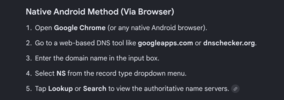
  3. Last check if there is a DNS issue
    Bash:
    $ dig NS domain.com
    Windows:
    Bash:
    nslookup -type=ns domain.com #(Standard Command Prompt)
    Resolve-DnsName -Name domain.com -Type NS #(PowerShell)
  4. 1782308106485.png
DNS after working is normally cached for hours or days on the DNS Server for that domain. DNS server FAILs are rare.
 
Last edited:
Unless there would be something set up wrong at the DNS side (such as using outdated DNS server url's or similar) there should be a minimal risk of a DNS server issue.

You should always:

1) run a comprehensive check before going online with a lander / campaign incl. loading in various GEO regions
2) make sure you use a high level hosting for the server to assure guaranteed fast loading time (ideally connected with a CDN)

Any slower loading time will, often majorly, negatively affect the results / conversions.
 
  1. Typo in the URL in the ad—is there a 404 error?
  2. No response? Open the IP of the server in a browser or better
    Bash:
    $ curl  -I -Lv -H "User-Agent: Mozilla/5.0 "  "https://www.domain.com/"
    can you connect to the server (at all)?
  3. Last check if there is a DNS issue
    Bash:
    $ dig NS domain.com
    Windows:
    Bash:
    nslookup -type=ns domain.com #(Standard Command Prompt)
    Resolve-DnsName -Name domain.com -Type NS #(PowerShell)
  4. View attachment 44207
DNS after working is normally cached for hours or days on the DNS Server for that domain. DNS server FAILs are rare.
Thanks for laying this out in detail, it's really helpful to see a structured flow like this.
Unless there would be something set up wrong at the DNS side (such as using outdated DNS server url's or similar) there should be a minimal risk of a DNS server issue.

You should always:

1) run a comprehensive check before going online with a lander / campaign incl. loading in various GEO regions
2) make sure you use a high level hosting for the server to assure guaranteed fast loading time (ideally connected with a CDN)

Any slower loading time will, often majorly, negatively affect the results / conversions.
Yes small issues like slow response or misconfigurations can easily get overlooked. Thanks for sharing your approach.
 
banners
Back